
Reading the character profiles
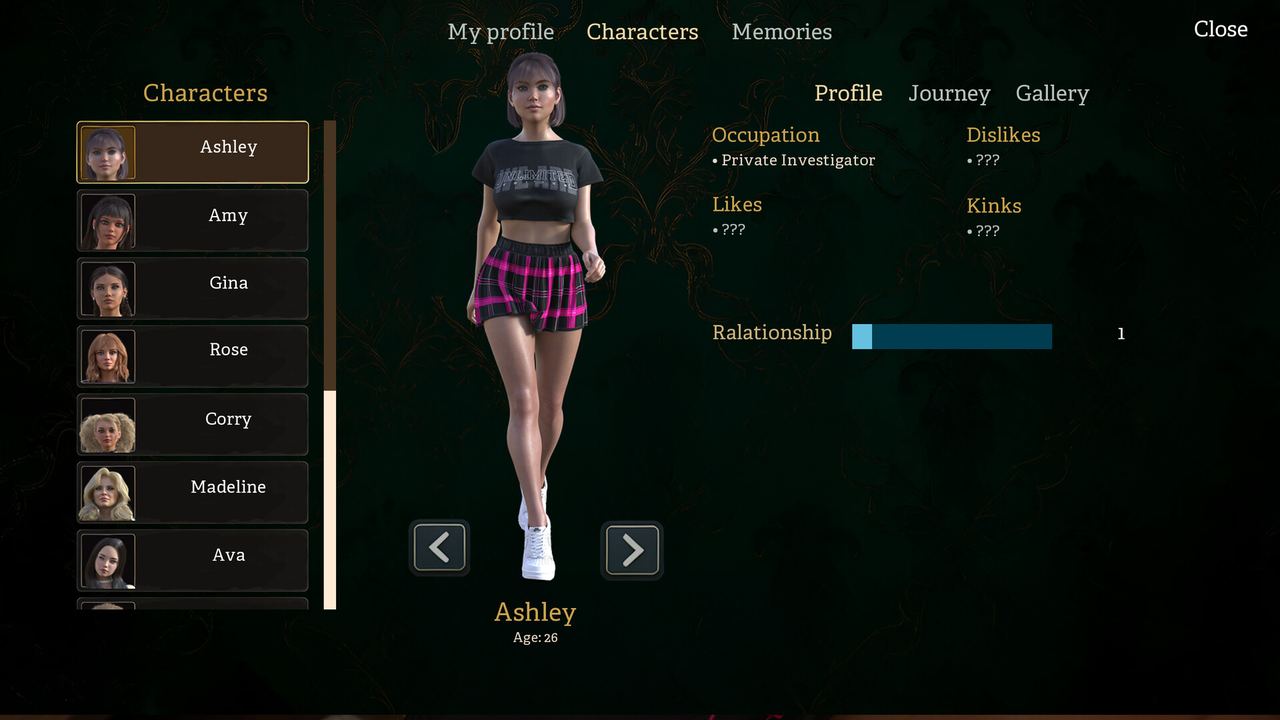
Each dossier has eight parts: Profile, Occupation, Likes, Dislikes, Kinks, Relationship, Memories and a Journey Gallery tab. Ashley's entry reads Age: 26 and Occupation: Private Investigator — the only age the demo screens show outright.
The character screen is the most information-dense thing in the I Have Known You demo. It is also the place where the game tells you what kind of story it is without a line of dialogue: eight fields per person, a second tab for progress, and one confirmed age that anchors the whole cast.
The screen itself
Characters opens as a list of seven names plus My Profile, with the selected character's dossier on the right and a Close control to go back. Two tabs sit at the top right: Profile and Journey Gallery.
The list is scrollable and each row is just the name — no portraits, no role labels, no relationship status. That minimalism is deliberate: the roster does not spoil who matters, and the dossier is where the detail lives.
Every field, and what each one is for
| Field | What the dossier shows | Why it is there |
|---|---|---|
| Profile | The character's summary, with the name repeated above it | The headline entry |
| Age | A number, e.g. Ashley: 26 | Adult-cast confirmation and casting |
| Occupation | A job title, e.g. Private Investigator | Social position in the town |
| Likes | A list | What moves the relationship up |
| Dislikes | A list | What moves it down |
| Kinks | A list | How explicit the romance design runs |
| Relationship | Current state with the protagonist | Your standing, in words rather than a number |
| Memories | A record of what has happened | What the game thinks you know |
| Journey Gallery | A separate tab | Progress through that character's arc |
Nine rows for what the screen presents as eight sections, because Journey Gallery is a tab rather than a field. The distinction is worth keeping: the first eight are static facts about a person, the ninth is dynamic progress.
The one confirmed age
Ashley's dossier reads Age: 26 and Occupation: Private Investigator. That is the only age the store screenshots show outright, and it does useful work even alone.
Twenty-six is an adult age that reads as "established but not settled": old enough to have a career, young enough that returning to a hometown is still a live question rather than a settled one. If the rest of the cast clusters around that number — and a seven-person ensemble in a romance-driven story usually does — then the game is telling you it is about people in their twenties working out what they are doing with their lives, with a witch hunt underneath.
Likes, Dislikes and Kinks
Three fields for preferences, and their placement next to each other tells you how the game intends to be played. Likes and Dislikes are the mechanical pair: they are what choices can satisfy or violate, and they are what a player learns by paying attention in conversation.
Kinks is the field that confirms the adult framing without the page having to be explicit. It is also a promise about the full game's content design: a dossier that tracks preferences at this level is a dossier built for a game where those preferences matter to the scenes you get.
If that is not what you want from a visual novel, this is the field that tells you early. If it is, the adult content guide covers how Steam gates the game and how the demo frames it.
Relationship and Memories
Relationship is the current state in words; the counter you see during dialogue is the change. The two work together: the counter is the event, the dossier is the standing.
Memories is the more interesting field. It records what has happened between the protagonist and that character, which means the game keeps a per-character history rather than a single plot log. In a story about returning to a town you grew up in, that is the correct structure — your history with each person is different, and the dossier is where that difference is visible.
Journey Gallery
The second tab. Where the Profile side is who someone is, the Journey Gallery is what you have done with them. The Journey system page covers what that implies for the full game.
How to use the screen while playing
- Open it after every significant scene. Memories is the fastest way to check whether you understood what just happened.
- Read Likes and Dislikes before a conversation you expect to matter. The game scores lines against them.
- Compare Relationship wording across characters. The dossier uses words, not numbers, so the wording itself is the scale.
- Check Journey Gallery after a free-roam section. If exploration writes progress, it writes it here.
What the screen tells you about the full game
Nine sections per character, seven characters, and one player file is a lot of authored interface for a demo. It implies the full game expects players to consult dossiers regularly, which in turn implies the cast is large enough and the relationships complex enough that memory alone will not do.
That is a good sign for a story-driven game and a warning for a casual one: this is not a visual novel you can read once with your hands off the keyboard. It expects you to look things up.
For the roster itself, read the cast overview. For how the relationship counter feeds these dossiers, read relationships and routes.
Every field name and value on this page was read from the demo's character screen and the official store screenshots on 3 November 2026.